Home / Users & permissions
Users & permissions
Create an account for each employee with the right role. Each user sees the screens that belong to their role, and the others are refused.
Accounts and seats
Every active account uses one licensed seat, and the owner sees how many remain. You create an account with a given role and can suspend it at any time.
- Licensed seats for each company
- A role for each account
- One device per account at a time
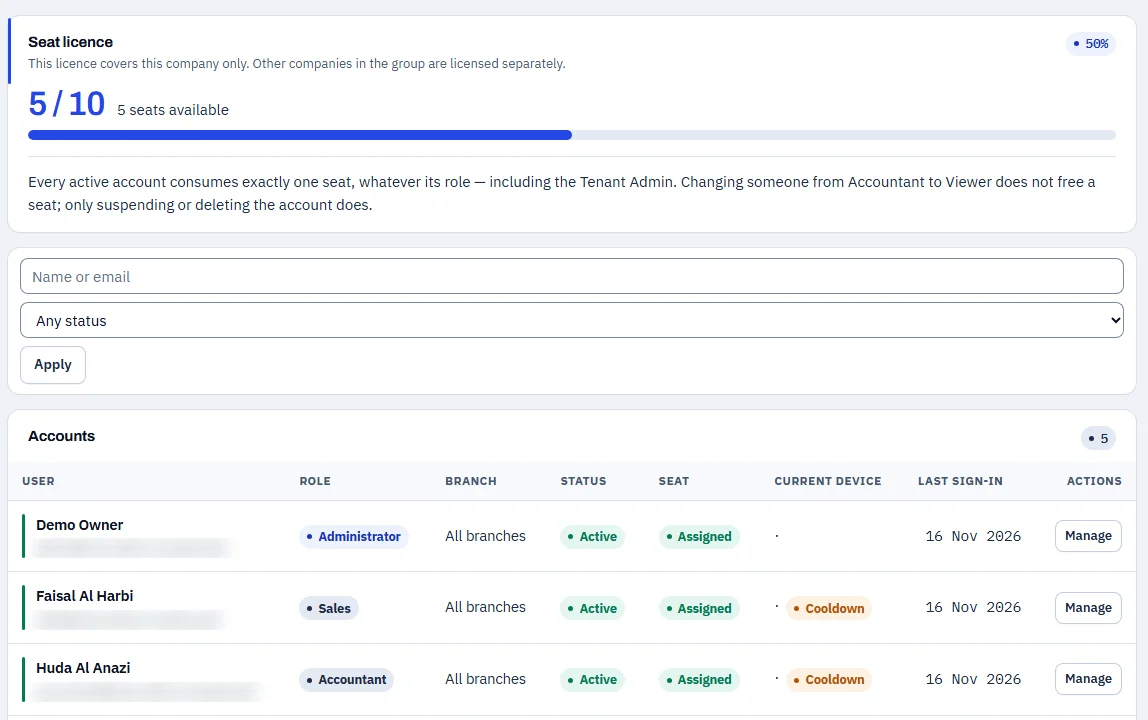
Swipe sideways to see the whole screen
What each role sees
| Role | Can open | Cannot open |
|---|---|---|
| Administrator | All screens, including users | — |
| Accountant | Dashboard, general ledger, trial balance, receivables, payables and invoices | User management |
| Sales | Customers, quotations and invoices | Dashboard, general ledger, payables and user management |
| Operations | Inventory, adjustments and purchase orders | Dashboard, general ledger and user management |
| View-only | Dashboard and the customer page, to read | Creating any record, and user management |
See NOVA on data that looks like your business
Request a demo and the Coder Link team will get in touch to agree a time.